
SPICE RUNNER
Track spice refinery runs, calculate melange payouts, and confirm payments — all inside Discord.
Add to Discord
Track spice refinery runs, calculate melange payouts, and confirm payments — all inside Discord.
Add to DiscordEverything your guild needs to manage spice hauls.
Record a completed haul with /sr run. Pick your refinery size, select participants, and the bot calculates melange produced, water consumed, refinery time, guild cut, and per-player payout. A run card is posted to the channel where each participant taps Mark Me as Paid.
Running back-to-back hauls? Use /sr session start to bundle multiple hauls together. Complete the session to post a combined summary with per-haul breakdowns to your log channel.
Use /sr calc to plan payouts without logging a run. Supports Small, Medium, and Large refineries with a Landsraad discount toggle (25% off sand and water costs).
See who's earned the most melange with /sr leaderboard (7d, 30d, or all time). View guild-wide production totals — sand harvested, melange refined, water consumed, and run count.
Every run tracks who has and hasn't been paid. Participants confirm with a button tap. Admins can force-mark payments. Unpaid runs auto-expire after a configurable number of days.
Configure default refinery, Landsraad discount, guild cut %, log channel, admin roles, and auto-expire timers. Post a setup guide to onboard your server. Full audit log of admin actions.
See SpiceRunner in action.
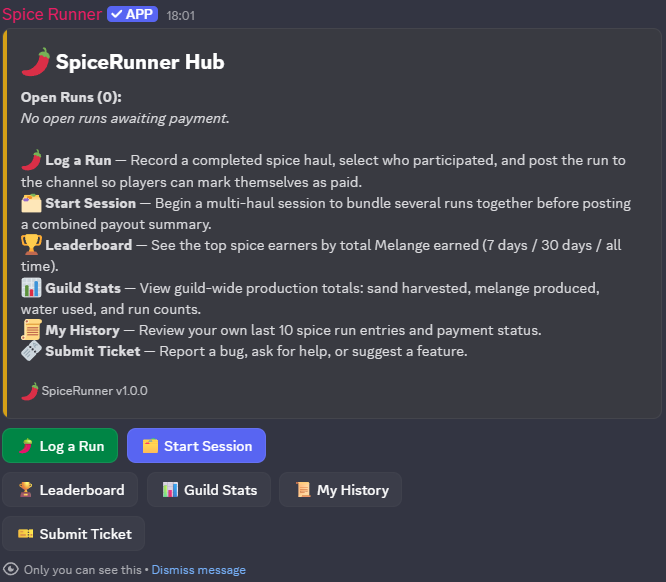
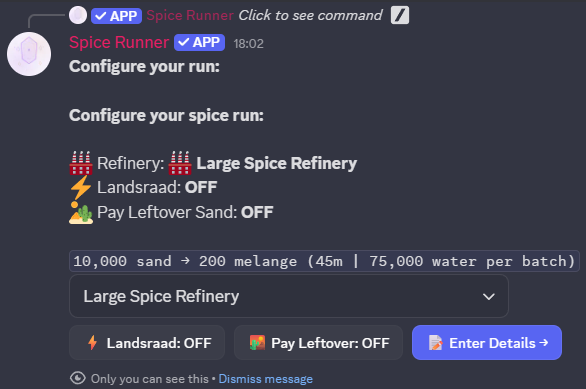
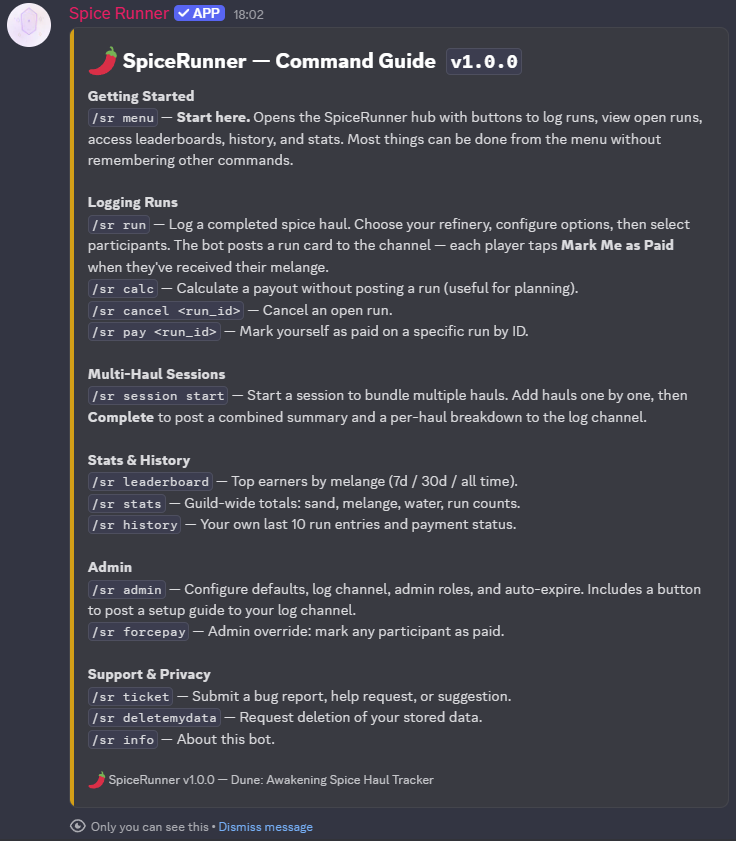
All commands use the /sr prefix.
| Command | Description |
|---|---|
/sr menu | Open the SpiceRunner hub — start here |
/sr run | Log a completed spice haul |
/sr calc | Calculate a payout without logging a run |
/sr session start | Start a multi-haul session |
/sr pay | Mark yourself as paid on a run |
/sr cancel | Cancel an open run |
/sr leaderboard | Top melange earners (7d / 30d / all time) |
/sr stats | Guild-wide production totals |
/sr history | Your recent runs and payment status |
/sr admin | Admin panel — settings, roles, defaults |
/sr forcepay | Admin: mark a participant as paid |
/sr ticket | Submit a bug report, help request, or suggestion |
/sr deletemydata | Request deletion of your stored data |
/sr help | Full command guide |
/sr info | About SpiceRunner — version & links |
Last updated: March 2026
SpiceRunner ("the Bot") is a Discord bot for tracking spice haul runs, calculating melange payouts, and managing participant records within Discord servers (guilds). This policy explains what data the Bot collects, how it is used, and your rights regarding that data.
When you interact with the Bot, the following data may be recorded:
| Data | Purpose |
|---|---|
| Discord User ID | Identifying participants in runs and payment records |
| Discord Display Name | Displayed alongside run records at time of submission |
| Discord Guild (Server) ID | Scoping all records to the correct server |
| Slash command inputs | Run details you provide (sand amounts, refinery type, etc.) |
| Payment status | Whether a participant has been marked as paid for a run |
| Timestamps | When runs were submitted and completed |
| Admin action log | Record of administrative actions taken via the Bot |
The Bot does not collect:
Collected data is used solely to:
Data is not sold, shared with third parties, or used for advertising.
Data is stored in a SQLite database on a private server controlled by the Bot operator. Data is associated with your Discord User ID and the Guild ID of the server where the interaction occurred.
You may request deletion of your data at any time using either of the following methods:
/sr deletemydata
command in any server where SpiceRunner is present. The bot will confirm your request and notify the operator immediately./sr ticket
command to reach the bot operator directly.Upon a valid request, your User ID and all associated records will be removed from the database.
The Bot runs on Discord's platform and is subject to Discord's Privacy Policy. The Bot operator has no control over data Discord itself collects.
This policy may be updated from time to time. The "Last updated" date at the top of this document will reflect any changes. Continued use of the Bot after changes are posted constitutes acceptance of the updated policy.
For privacy questions, data deletion requests, or bug reports, use one of the following:
/sr ticket command inside Discord./sr deletemydata inside Discord.Last updated: March 2026
By adding SpiceRunner ("the Bot") to your Discord server or using any of its commands, you agree to be bound by these Terms of Service ("Terms"). If you do not agree to these Terms, do not use the Bot.
These Terms apply to all users of the Bot, including server administrators and individual participants.
SpiceRunner is a Discord bot designed to help Dune: Awakening communities track spice haul runs, calculate melange payouts, manage participant records, and view run history and leaderboards. The Bot is provided free of charge as a community tool.
You must comply with Discord's Terms of Service and Community Guidelines to use this Bot. By using the Bot you confirm that you meet Discord's minimum age requirements for your region.
You agree to use the Bot only for its intended purpose of tracking in-game spice haul activity. You must not:
The person who adds the Bot to a Discord server ("server administrator") is responsible for:
Use of the Bot involves the collection of certain Discord data. Please review the SpiceRunner Privacy Policy for full details of what is collected, how it is used, and how to request deletion.
The Bot is provided on a best-effort basis. The operator makes no guarantee of uptime, availability, or uninterrupted service. The Bot may be taken offline for maintenance, updates, or any other reason at any time without notice.
The Bot is provided "as is" without warranty of any kind, express or implied. The operator makes no warranties regarding accuracy of calculations, fitness for a particular purpose, or that the Bot will be free of errors or interruptions.
Melange payout calculations are provided as a convenience tool. The operator is not responsible for any disputes arising from in-game transactions based on Bot output.
To the fullest extent permitted by applicable law, the Bot operator shall not be liable for any indirect, incidental, or consequential damages arising from your use of or inability to use the Bot, including but not limited to loss of in-game currency, items, or missed payments between players.
The operator reserves the right to remove the Bot from any server or restrict access for any user at any time, particularly in cases of abuse or violation of these Terms.
You may remove the Bot from your server at any time via Discord's server settings.
Removal does not automatically delete stored data. To request deletion of your data,
use /sr deletemydata inside Discord before removing the Bot,
or contact the operator directly (see Section 12).
These Terms may be updated from time to time. The "Last updated" date at the top of this document will reflect any changes. Continued use of the Bot after updated Terms are posted constitutes acceptance of the revised Terms.
For questions, bug reports, or to report abuse, use one of the following:
/sr ticket command inside Discord./sr deletemydata inside Discord./sr ticket inside Discord to reach the bot operator.